CODE MORTAR
EH Smith Connect

CRM Platform
AI Assistants
Proposal Builder
Data Analytics
Supplier Portal
EH Smith is a long-established builders' merchant. We have been working with them for several years, providing them with a bespoke web platform that includes a CRM system, AI assistants, a proposal builder and interactive data analytics dashboards. We continue to work closely with EH Smith to innovate the platform in response to user feedback and evolving needs.
- CRM Platform: Advanced CRUD system for customer and supplier records, project, product and quote management. Connects to Akeneo, Kerridge and SharePoint APIs to pull in product and delivery data.
- AI Assistants: Using OpenAI, built a series of assistants that interpret and process complex quote spreadsheets, assist salespeople with proposals and customer queries.
- Proposal Builder: Drag-and-drop interface for building proposals, allowing salespeople to quickly generate proposals using up-to-date data. Generates proposals that can be viewed and interacted with by customers on the app.
- Data Analytics Dashboards: Using Anthropic's Claude API, generate dynamic database queries for reporting and data analysis based on the user's query. Produce interactive dashboards that visualise complex and vast data, providing information and insights that were previously near-impossible to obtain. Helps the team make informed purchasing and forecast decisions based on real-time insights. Read the case study.
- Supplier Portal: We onboarded EH Smith's supplier Wienerberger, who now amend brick schedules directly in the platform — replacing a slow process of emailing spreadsheets and swapping notes over SharePoint — and have since added Total Clay Solutions, with more suppliers to follow.
- AI Guardrails: All AI assistants are built with strict guardrails, and internal logic is used where possible to reduce the chances of hallucinations or incorrect actions being taken.
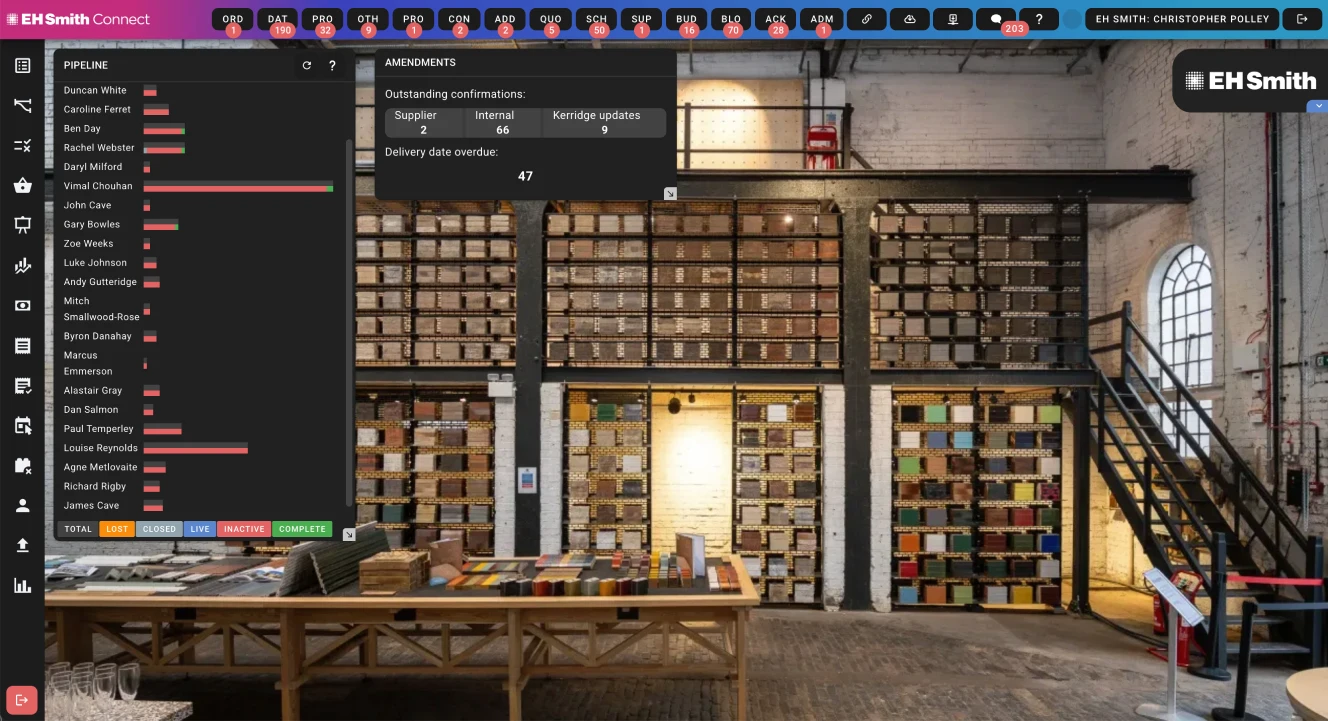
Connect homepage, including dynamic analytics widgets. Users can personalise their homepage by selecting from a range of widgets, allowing them to access the information and insights that are most relevant to them as soon as they log in.
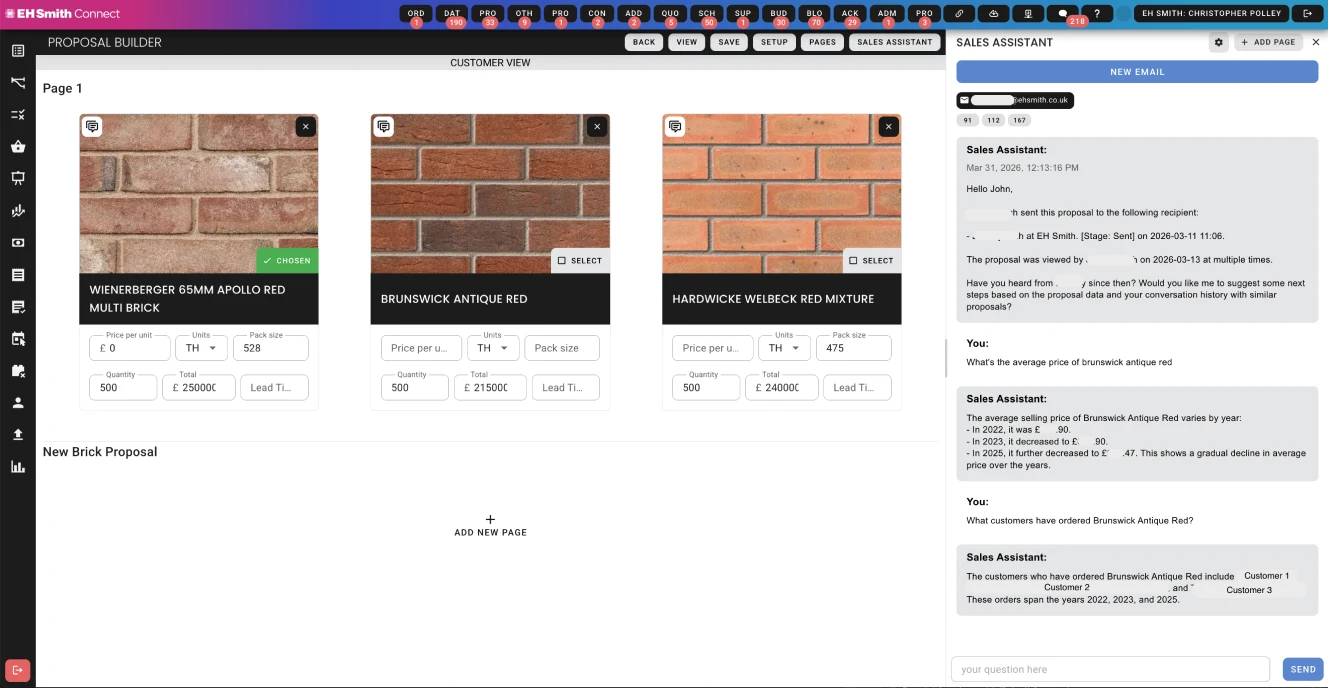
Drag-and-drop proposal builder. Users can consult with the AI assistant to generate proposals, and then edit and customise them using the builder interface.
Case study: plain-English questions over live business data
The analytics assistant in EH Smith Connect
The problem
EH Smith's sales and purchasing data sits across customers, suppliers, products, quotes, proposals and deliveries. The team kept asking questions that cut across that data: how much of a product has been delivered on a project, what the margin is on one supplier's products, how volumes have moved month to month. Answering them meant asking someone who could write SQL, or exporting to a spreadsheet and doing it by hand.
We built an assistant into Connect that answers these questions directly. A user types a question, and gets an answer in a sentence or two, the table behind it and a chart. Questions can be saved and reopened later with current figures. Total Clay Solutions, one of EH Smith's suppliers, uses the same platform.
The hard part was not getting a model to write SQL. It was making sure the system only ever reads the data it should, gives answers people can trust, and doesn't cost more than it needs to.
How it works
- Understand the question. A small, fast model reads the message along with the recent conversation, plus earlier messages found by embedding similarity. It rewrites the question as a self-contained data request, so a follow-up like “what about the red ones?” carries over the filters from the question before. It also decides whether data is needed at all, whether to ask the user for clarification, and how capable a model the final answer needs. Simple lookups go to a cheaper model, and multi-step analysis to a stronger one.
- Generate the query. A second call turns that request into a single PostgreSQL
SELECT. The model doesn't see the raw database. It gets a hand-written description of the relevant part of the schema: which tables matter for this kind of question, how they join, and business rules such as what counts as a completed delivery. Restricting this to the relevant topic keeps prompts small and cuts down on invented columns. The model returns structured JSON with the query, parameter values kept separate from the SQL, and a one-line explanation. If the question can't be answered from the data, it returns no query and says why. - Learn from curated examples. We keep a library of reviewed question-and-query pairs, each with a rating and notes. The examples closest to a new question are found by embedding similarity and given to the model. When the assistant gets something wrong, we fix the example rather than rewriting the prompt. Examples are checked automatically, and bad ones can be taken out of use.
- Check the query and limit what it can do. Model-written queries are checked in code before they run, and run with database permissions that only allow reading. Anything that fails a check is rejected with a reason.
- Recover from errors. If the database rejects a query, or validation does, the error goes back to the model with a request to fix it, up to two retries. If it still can't produce a valid query, the user gets a plain answer saying so, never a made-up result.
- Answer and chart. The rows go to the answering model. It writes a short summary and a chart definition, which the front end draws.
- Keep saved questions current without paying again. When a user saves a question, we store the generated SQL. Reopening it re-runs that stored query, with a row limit, so the table and chart are up to date. The written summary is reused rather than generated again, because viewing a saved question shouldn't cost a model call every time.
- Track cost. Token usage is recorded for each user per day, with limits, so heavy use is visible and capped.
Design decisions
- Use plain code wherever it's reliable enough. Models handle the open-ended parts: interpreting questions and writing SQL. Where a fixed rule works, we use the rule. For example, a short affirmative after a message that asked for confirmation is detected in code, not left to the model.
- Layered safety. Checks in code and limits in the database each cover for the other, so a mistake in one doesn't expose the data.
- Give the model a curated schema, not the whole database. Describing the data the way the business talks about it, with the rules spelled out, keeps the model working from what the data means rather than guessing from table and column names.
- Use models of different sizes for different steps. Classifying a question and answering a greeting don't need the most capable model. Choosing the model per question keeps costs down without hurting answers to harder questions.
- Fix mistakes in the example library. It gives us a way to correct bad answers that we can test, without growing the prompt.
Results
EH Smith can now answer questions about their business operations that they had no practical way to answer before. The data existed, but it was spread across systems and needed someone to write a query or piece it together by hand. Now anyone on the team can ask in plain English and get the answer, with the table and chart behind it.
What we learned
The main lesson was about balance. We needed to keep token usage low, keep the model within strict limits, and still give an answer that was actually well informed. These pull against each other. Giving the model more context usually improves answers but costs more. Tighter rules keep it safe but can leave it without the information it needs.
What worked was being selective about context rather than cutting it:
- Give each step only what it needs. The step that interprets a question doesn't need the schema. The query step only gets the part of the schema relevant to the question's topic.
- Put the rules into the structure, not just the instructions. Requiring structured output, allowing only one kind of statement and checking every query in code mean the prompt doesn't have to keep repeating the rules.
- Use examples instead of a longer prompt. A few reviewed examples close to the question show the model what a good answer looks like, at far fewer tokens than putting everything into one prompt.
- Match the model to the question. The most capable model is only used when the question needs it.
- Don't pay twice for the same answer. Saved questions re-run their stored query for fresh numbers instead of going back to the model.
Stack
Vue front end, Node back end, PostgreSQL with vector search for embeddings, Anthropic's Claude models for the analytics assistant, and ApexCharts for charts.